"dmp_native_support" parameter is required to turn on in order for the DMP to provide Linux LVM VG multipathing.
# vxdmpadm settune dmp_native_support=on
# vxdmpadm gettune |grep support
dmp_native_support on off
# lvmdiskscan |grep emc |grep LVM
/dev/vx/dmp/emc_clariion0_1000 [ 15.00 GB] LVM physical volume
/dev/vx/dmp/emc0_05ff [ 1.01 GB] LVM physical volume
/dev/vx/dmp/emc0_05fe [ 1.01 GB] LVM physical volume
/dev/vx/dmp/emc0_05fd [ 1.01 GB] LVM physical volu
Showing posts with label Linux. Show all posts
Showing posts with label Linux. Show all posts
Thursday, September 29, 2011

Wednesday, September 28, 2011
Linux Storage Foundatione Oracle RAC diskgroup and volume failure.
When all paths are disconnected/reconnected to SF Oracle RAC cluster node, some strange behaviour might occur. The vmax_sfracdg diskgroup appeared to be stale, some disks like emc_0604 was showing 2 entries in the diskgroup. The diskgroup failed to deport and the volume denied to be stopped. The volume was still active in the kernel as explained in Symantec site. Reboot system is the only solution.
# vxdisk list -o alldgs |grep vmax_sfrac
emc0_0604 auto:cdsdisk emcpoweral vmax_sfracdg online shared
emc0_0604 auto:cdsdisk - (vmax_sfracdg) online shared
emc0_0605 auto:cdsdisk emcpowerak vmax_sfracdg online shared
emc0_0606 auto:cdsdisk emcpoweraj vmax_sfracdg online shared
emc0_0606 auto:cdsdisk - (vmax_sfracdg) online shared
emc0_0608 auto:cdsdisk emcpowerah vmax_sfracdg online shared
# vxdg deport vmax_sfracdg
VxVM vxdg ERROR V-5-1-584 Disk group vmax_sfracdg: Some volumes in the disk group are in use
# vxvol -g vmax_sfracdg stopall
VxVM vxvol ERROR V-5-1-1220 Volume sfracvol1 is currently open or mounted
VxVM vxvol ERROR V-5-1-1220 Volume sfracvol2 is currently open or mounted
VxVM vxvol ERROR V-5-1-1220 Volume sfracvol3 is currently open or mounted
VxVM vxvol ERROR V-5-1-1220 Volume sfracvol4 is currently open or mounted
VxVM vxvol ERROR V-5-1-1220 Volume sfracvol5 is currently open or mounted
#vxprint -g vmax_sfracdg -m sfracvol1 |grep devopen
devopen=on
# vxdisk list -o alldgs |grep vmax_sfrac
emc0_0604 auto:cdsdisk emcpoweral vmax_sfracdg online shared
emc0_0604 auto:cdsdisk - (vmax_sfracdg) online shared
emc0_0605 auto:cdsdisk emcpowerak vmax_sfracdg online shared
emc0_0606 auto:cdsdisk emcpoweraj vmax_sfracdg online shared
emc0_0606 auto:cdsdisk - (vmax_sfracdg) online shared
emc0_0608 auto:cdsdisk emcpowerah vmax_sfracdg online shared
# vxdg deport vmax_sfracdg
VxVM vxdg ERROR V-5-1-584 Disk group vmax_sfracdg: Some volumes in the disk group are in use
# vxvol -g vmax_sfracdg stopall
VxVM vxvol ERROR V-5-1-1220 Volume sfracvol1 is currently open or mounted
VxVM vxvol ERROR V-5-1-1220 Volume sfracvol2 is currently open or mounted
VxVM vxvol ERROR V-5-1-1220 Volume sfracvol3 is currently open or mounted
VxVM vxvol ERROR V-5-1-1220 Volume sfracvol4 is currently open or mounted
VxVM vxvol ERROR V-5-1-1220 Volume sfracvol5 is currently open or mounted
#vxprint -g vmax_sfracdg -m sfracvol1 |grep devopen
devopen=on
Wednesday, September 21, 2011
LVM SG transition fails in all paths disabled in Linux
If all the paths to the disks have disabled, the LVM2 vg commands stop
responding and wait until at least one path to the disks is restored. As
Release Notes, it is a known issues.
LVMVolumeGroup agent uses LVM2 commands, this behavior causes online and offline entry points of LVMVolumeGroup agent to time out and clean EP stops responding for an indefinite time. Because of this, the service group cannot failover to another node.
Workaround: You need to restore at least one path.
Refer to this https://sort.symantec.com/public/documents/sfha/5.1sp1pr2/linux/productguides/pdf/vcs_notes_51sp1pr2_lin.pdf. page 43 for more detail.
Tuesday, September 20, 2011
Update VXVM&ASL/APM packages on Linux
Command to update VxVM ASL/APM.
# ls -l
total 19968
-rw-r--r-- 1 root root 158990 Sep 21 10:50 VRTSaslapm-5.0.000.000-internal_SLES11.x86_64.rpm
-rw-r--r-- 1 root root 20258631 Sep 21 10:50 VRTSvxvm-5.0.000.000-internal_SLES11.x86_64.rpm
# rpm -Uvh --force *.rpm --nodeps
Preparing... ########################################### [100%]
stopping vxconfigd
1:VRTSvxvm ########################################### [ 50%]
Installing file /etc/init.d/vxvm-boot
vxvm-boot 0:off 1:off 2:on 3:on 4:on 5:on 6:off
creating VxVM device nodes under /dev
Installing keys for APMs
2:VRTSaslapm ########################################### [100%]
Installing keys for APMs
#shutdown -r now
# ls -l
total 19968
-rw-r--r-- 1 root root 158990 Sep 21 10:50 VRTSaslapm-5.0.000.000-internal_SLES11.x86_64.rpm
-rw-r--r-- 1 root root 20258631 Sep 21 10:50 VRTSvxvm-5.0.000.000-internal_SLES11.x86_64.rpm
# rpm -Uvh --force *.rpm --nodeps
Preparing... ########################################### [100%]
stopping vxconfigd
1:VRTSvxvm ########################################### [ 50%]
Installing file /etc/init.d/vxvm-boot
vxvm-boot 0:off 1:off 2:on 3:on 4:on 5:on 6:off
creating VxVM device nodes under /dev
Installing keys for APMs
2:VRTSaslapm ########################################### [100%]
Installing keys for APMs
#shutdown -r now
Monday, September 12, 2011
Remove PowerPath failure with VxVM on Linux
PowerPath removal will fail when the underneath PowerPath devices are used by Veritas Volume Manager. Therefore, it is necessary to remove PowerPath devices from VxVM before removing the PowerPath package.
Steps to remove PowerPath with VxVM on Linux
1. for i in `vxdisk list | grep emcpower |awk '{print $1}'`;do vxdisk rm $i;done
3. #/etc/init.d/PowerPath stop
2. rpm -e EMCpower.LINUX-5.1.0-194
Refer to http://www.symantec.com/business/support/index?page=content&id=TECH70180 for more detail.
Steps to remove PowerPath with VxVM on Linux
1. for i in `vxdisk list | grep emcpower |awk '{print $1}'`;do vxdisk rm $i;done
3. #/etc/init.d/PowerPath stop
2. rpm -e EMCpower.LINUX-5.1.0-194
Refer to http://www.symantec.com/business/support/index?page=content&id=TECH70180 for more detail.
Monday, September 5, 2011
VCS SG Linux LVM failure due to all paths disabled
There is a limitation on VCS LVMVolumeGroup agent and Linux LVM causing SG LVM SG cannot failover to other node when there's all path disabled on the active node. It is a known issue which is documented.
Refer to VCS release notes https://sort.symantec.com/public/documents/sfha/5.1sp1pr2/linux/productguides/pdf/vcs_notes_51sp1pr2_lin.pdf page 43 for more details.
Refer to VCS release notes https://sort.symantec.com/public/documents/sfha/5.1sp1pr2/linux/productguides/pdf/vcs_notes_51sp1pr2_lin.pdf page 43 for more details.
Wednesday, August 31, 2011
VCS Linux LVM Resource using PowerPath as third party driver multipathing
If PowerPath is being used as multipathing software for VCS LVMVolumeGroup Resource, PowerPath Pseudo name must be used for PV creation and native OS path name must be filtered for LVM as shown in RED below. Otherwise, LVM will not failover properly for device path failure causing VCS LVM Service Group failing as well.
# more /etc/lvm/lvm.conf |grep filter |grep -v "#"
filter = [ "r|^/dev/(sda)[0-9]*$|", "r|^/dev/(sda)[a-z]*$|", "r|^/dev/(sdc)[a-z]*$|", "r|/dev/vx/dmp/.*|", "r|/dev/block/.*|", "r|/dev/VxDMP.*|", "r|/dev/vx/dmpconfig|", "r|/dev/vx/rdmp/.*|", "r|/dev/dm-[0-9]*|", "r|/dev/mpath/mpath[0-9]*|", "r|/dev/mapper/mpath[0-9]*|", "r|/dev/disk/.*|","r|/dev/.*/by-path/.*|", "r|/dev/.*/by-id/.*|", "a/.*/" ]
# powermt display dev=emcpowerar |egrep "sda|sdc"
6 qla2xxx sdaf FA 8fB active alive 0 0
5 qla2xxx sdcb FA 7fB active alive 0 0
# powermt display dev=emcpoweras |egrep "sda|sdc"
6 qla2xxx sdae FA 8fB active alive 0 0
5 qla2xxx sdca FA 7fB active alive 0 0
# powermt display dev=emcpoweraq |egrep "sda|sdc"
6 qla2xxx sdag FA 8fB active alive 0 0
5 qla2xxx sdcc FA 7fB active alive 0 0
#vgdispay -v vmax
--- Volume group ---
VG Name vmax
System ID
Format lvm2
Metadata Areas 3
Metadata Sequence No 58
VG Access read/write
VG Status resizable
MAX LV 0
Cur LV 1
Open LV 0
Max PV 0
Cur PV 3
Act PV 3
VG Size 3.01 GB
PE Size 4.00 MB
Total PE 771
Alloc PE / Size 700 / 2.73 GB
Free PE / Size 71 / 284.00 MB
VG UUID buYhkI-iIHB-ppPr-sgar-DlI8-6KeK-bweUd0
--- Logical volume ---
LV Name /dev/vmax/vmaxvol
VG Name vmax
LV UUID ip0WHa-nCgP-wNbe-61yT-3T7d-LHoq-aVTLod
LV Write Access read/write
LV Status available
# open 0
LV Size 2.73 GB
Current LE 700
Segments 3
Allocation inherit
Read ahead sectors auto
- currently set to 1024
Block device 253:0
--- Physical volumes ---
PV Name /dev/emcpoweraq
PV UUID xFoNsX-47n2-mBeL-UkxM-iZ5p-lIcw-xJndJV
PV Status allocatable
Total PE / Free PE 257 / 0
PV Name /dev/sdcb (improper LVM filtering)
PV UUID UV5ip7-T73S-Hbnp-w6bM-CrIs-7tYj-ti5g9C
PV Status allocatable
Total PE / Free PE 257 / 0
PV Name /dev/sdca (improper LVM filtering)
PV UUID lsYJmT-Etak-Gz27-9yG1-Hzxv-EP7T-G48ZyJ
PV Status allocatable
Total PE / Free PE 257 / 71
# vgscan
Reading all physical volumes. This may take a while...
Found duplicate PV 7WcanQm06zYfK0TdUPo7ABQy0cR4AHRN: using /dev/emcpowerar not /dev/vx/dmp/pp_emc0_9
Found duplicate PV P3gU7FTqwVpOzGmep2cf2yILcqxFlvHX: using /dev/emcpoweras not /dev/vx/dmp/pp_emc0_8
Found duplicate PV BRnJgGZrMwliZFSmnCDOgH54HCIaIXKX: using /dev/vx/dmp/pp_emc0_10 not /dev/emcpoweraq (improper LVM filtering)
Found volume group "vmax" using metadata type lvm2
# more /etc/lvm/lvm.conf |grep filter |grep -v "#"
filter = [ "r|^/dev/(sda)[0-9]*$|", "r|^/dev/(sda)[a-z]*$|", "r|^/dev/(sdc)[a-z]*$|", "r|/dev/vx/dmp/.*|", "r|/dev/block/.*|", "r|/dev/VxDMP.*|", "r|/dev/vx/dmpconfig|", "r|/dev/vx/rdmp/.*|", "r|/dev/dm-[0-9]*|", "r|/dev/mpath/mpath[0-9]*|", "r|/dev/mapper/mpath[0-9]*|", "r|/dev/disk/.*|","r|/dev/.*/by-path/.*|", "r|/dev/.*/by-id/.*|", "a/.*/" ]
# powermt display dev=emcpowerar |egrep "sda|sdc"
6 qla2xxx sdaf FA 8fB active alive 0 0
5 qla2xxx sdcb FA 7fB active alive 0 0
# powermt display dev=emcpoweras |egrep "sda|sdc"
6 qla2xxx sdae FA 8fB active alive 0 0
5 qla2xxx sdca FA 7fB active alive 0 0
# powermt display dev=emcpoweraq |egrep "sda|sdc"
6 qla2xxx sdag FA 8fB active alive 0 0
5 qla2xxx sdcc FA 7fB active alive 0 0
#vgdispay -v vmax
--- Volume group ---
VG Name vmax
System ID
Format lvm2
Metadata Areas 3
Metadata Sequence No 58
VG Access read/write
VG Status resizable
MAX LV 0
Cur LV 1
Open LV 0
Max PV 0
Cur PV 3
Act PV 3
VG Size 3.01 GB
PE Size 4.00 MB
Total PE 771
Alloc PE / Size 700 / 2.73 GB
Free PE / Size 71 / 284.00 MB
VG UUID buYhkI-iIHB-ppPr-sgar-DlI8-6KeK-bweUd0
--- Logical volume ---
LV Name /dev/vmax/vmaxvol
VG Name vmax
LV UUID ip0WHa-nCgP-wNbe-61yT-3T7d-LHoq-aVTLod
LV Write Access read/write
LV Status available
# open 0
LV Size 2.73 GB
Current LE 700
Segments 3
Allocation inherit
Read ahead sectors auto
- currently set to 1024
Block device 253:0
--- Physical volumes ---
PV Name /dev/emcpoweraq
PV UUID xFoNsX-47n2-mBeL-UkxM-iZ5p-lIcw-xJndJV
PV Status allocatable
Total PE / Free PE 257 / 0
PV Name /dev/sdcb (improper LVM filtering)
PV UUID UV5ip7-T73S-Hbnp-w6bM-CrIs-7tYj-ti5g9C
PV Status allocatable
Total PE / Free PE 257 / 0
PV Name /dev/sdca (improper LVM filtering)
PV UUID lsYJmT-Etak-Gz27-9yG1-Hzxv-EP7T-G48ZyJ
PV Status allocatable
Total PE / Free PE 257 / 71
# vgscan
Reading all physical volumes. This may take a while...
Found duplicate PV 7WcanQm06zYfK0TdUPo7ABQy0cR4AHRN: using /dev/emcpowerar not /dev/vx/dmp/pp_emc0_9
Found duplicate PV P3gU7FTqwVpOzGmep2cf2yILcqxFlvHX: using /dev/emcpoweras not /dev/vx/dmp/pp_emc0_8
Found duplicate PV BRnJgGZrMwliZFSmnCDOgH54HCIaIXKX: using /dev/vx/dmp/pp_emc0_10 not /dev/emcpoweraq (improper LVM filtering)
Found volume group "vmax" using metadata type lvm2
VCS Linux Native LVM Service Group goes into partial state
VCS Linux LVM Service Group will go into partial state once all the cluster nodes are rebooted. Linux LVM will auto-import VG and start the LVM volumes. "EnableLVMTagging" option must be enabled to allow VCS to manage LVM.
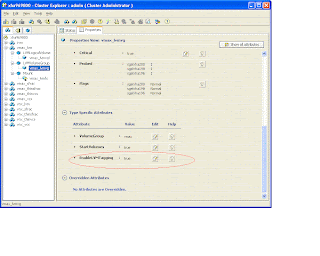
Refer to New and modified attributes for 5.1 SP1 agents for this new attribute information.
LVMVolumeGroup lvmvg (
VolumeGroup = VG
EnableLVMTagging = 1
StartVolumes = 1
)

Refer to New and modified attributes for 5.1 SP1 agents for this new attribute information.
Subscribe to:
Posts (Atom)